How to Create an Order
Step-by-Step Guide to Placing Your First Order on Proc360
How to Create an Order on Proc360 and Request a Quote
Watch the video below for a quick walkthrough. If you prefer reading, you'll find the step-by-step guide right after.
Ready to place your order? You've added items to your cart, and now you're ready to submit items and get a quotation. Follow these steps to make your ordering process quick and effortless.
Go to Cart
Once you log in, you'll see the homepage. Click on "Add items to Cart."
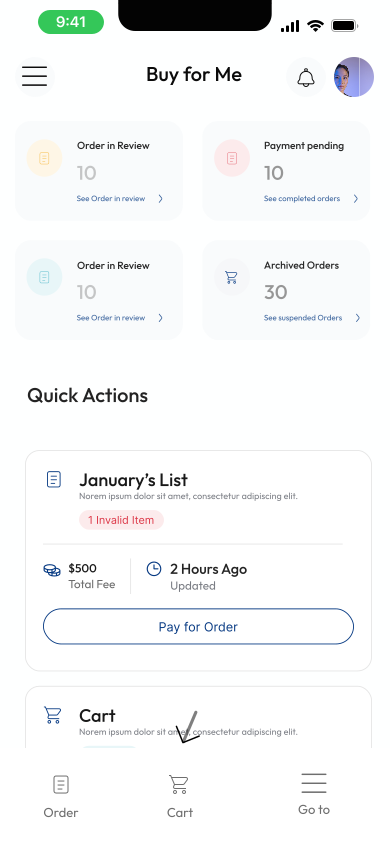
If it's empty, add pictures or links of what you want to your cart first
See the full guide on add items to cart here
Review Your Cart
Once your items are in your cart, before creating your order, take a moment to:
- Confirm that nothing important is missing.
- Make sure all items have the quantity you want and the specifications you want
Select the items you're ready to buy
To make an order, you need to choose some items in your cart that you are ready to buy
- Click the checkboxes to select the items you want to add to the order
- You can add as many items as you need to one order
- You can add items of different types, whether links, pictures, or text, to one order
- Any unselected items will remain stored in your cart for future use.
Create Your Order
Once you've selected the items you wish to add
- Click "Create Order".
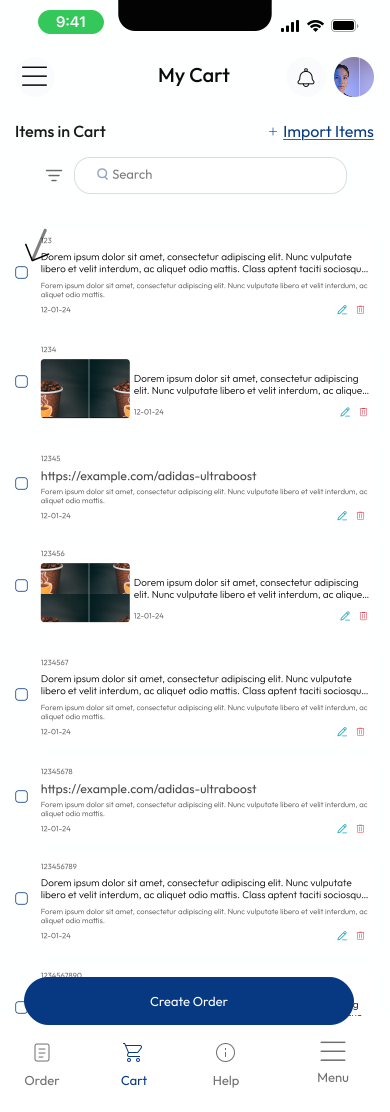
2. Enter an Order Title (e.g., My First Order).
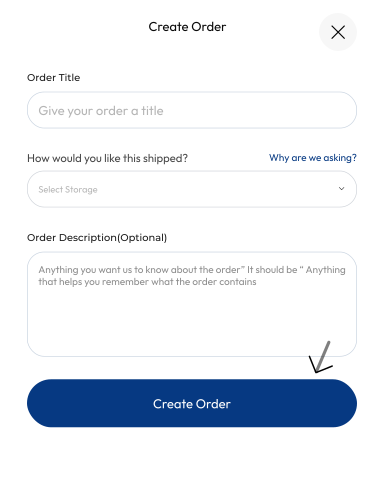
3. Choose your shipping method (Sea or Air).
Don't worry, you can change this later if you change your mind before shipping
4. Click "Request Quote"
And that’s it! Your order is now in motion and waiting to be quoted! Proc360 will take care of the sourcing while you wait for your quote. Keep an eye on your dashboard for updates.