How to Request for Quality Check
Check Before You Ship—Request Quality Inspection on Proc360 with Ease
How to Request Quality Check on Proc360
Watch the video below for a quick walkthrough. If you prefer reading, you'll find the step-by-step guide right after.
When shopping from Chinese marketplaces, verifying what you ordered is key. With Proc360, you can request a quality check to give you peace of mind before your items are shipped.
Types of Quality Checks
1. Quantity & General Appearance This basic check ensures:
- The quantity received matches your order
- The items are free from visible defects, stains, or physical damage
2. Composition & Functionality This deeper check covers:
- Ensuring the size, color, style, material, and design are exactly what you ordered?
- That the items work as expected,
Composition & Functionality checks are not available yet on Proc360, but they’re on the way!
Steps to Request a Quality Check
- Add a Parcel (see here the guide on how to add a parcel)
While you're adding the parcel, you'll see a checkbox to “Request Quality Check”
- Request a Quality Check. Tick the “Request Quality Check” box and select the type you want:
- Quantity & General Appearance
- Composition & Functionality (coming soon)
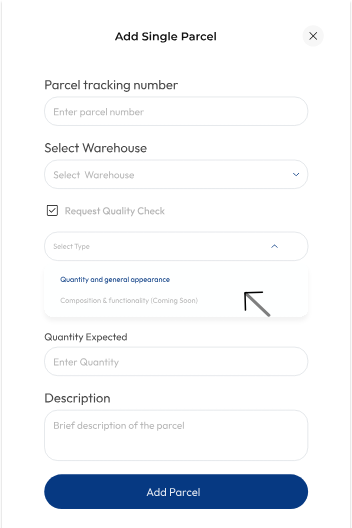
- Add Quantity : Scroll down and indicate the quantity for each parcel.
- Submit Request
And that’s it. With just a few clicks, you can be confident that what you ordered is what you’ll get.